PROJECT private preview · not released yet
Unflat
A link to the exact revision of a 3D model, instead of another screenshot.
Unflat turns STL parts into fixed, hash-checked versions and a static site where you can orbit them, hide parts, pull an assembly apart and clip through it, on a laptop or a phone. Any agent or script can publish a version and send you the link.
scroll: it comes apart · drag: turn it yourself
Drag or use the arrow keys to turn a model, + and − to zoom, 0 to reset. On a phone, swipe sideways to turn; up and down still scrolls the page.
02 · the screenshot problem
Always just out of frame
I was iterating on a 3D-printed iPhone charging stand with an agent. Every revision came back as a description and maybe one render. The part I needed was always on the other side: is that wall thick enough, where does the cable go, what's under the tray?
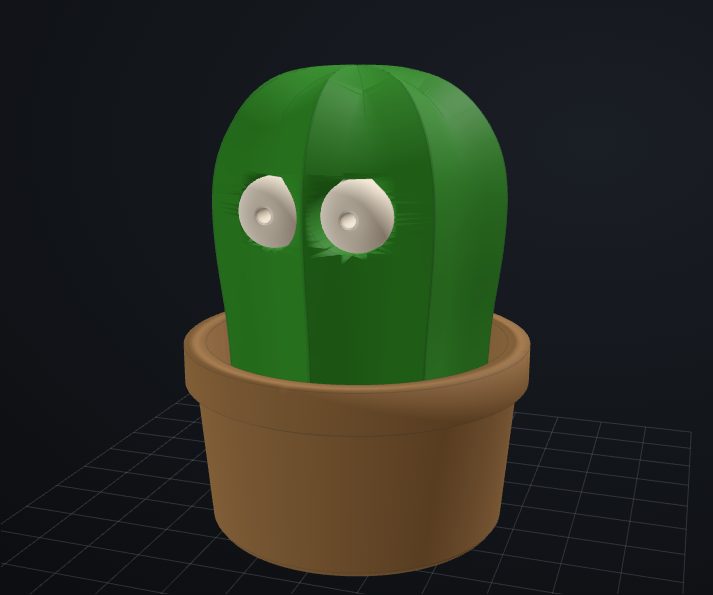
A link lets you look for yourself. Turn the Pop-eyed Cactus around and pull apart the cactus, eyes, pot and spring. The viewer keeps the cactus as a static assembly. A trial bend of the spring's central leaf didn't give believable eye travel. In the supplied model the eye and leaf triangles already intersect, and the bent leaf lost contact before any usable range showed up. So there is no spring motion here, and the explode offsets are only directions for inspection.
Pop-eyed Cactus by Patopato_Design, imported from the 3MF I uploaded. It carries the Standard Digital File License. Published here with the author's permission.
03 · parts, not a picture
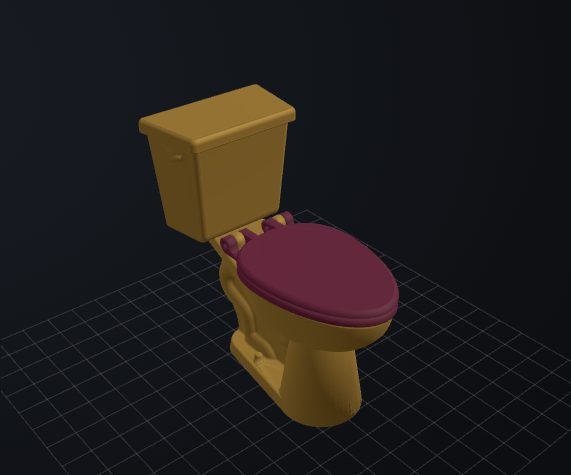
Yes, even a toilet
Each STL stays its own part, with an assembled position and an explode offset. Orbit the assembly or pull its parts apart.
Here the four uploaded meshes move. The lid and seat open on hinge axes measured from their coaxial features, and you can set each angle or play the opening cycle. Those axes come from the geometry, not from the author. Who made it, whether it really is The Golden Toilet and whether it prints and fits are all unverified. There's no flush simulation.
04 · what it does
Publish, export, send a link
- Publish.
unflat publish spec.jsonturns each STL part into a GLB, compares the GLB with the STL triangle for triangle and stores an immutable version. A version id is never reused for different content. - Export.
unflat export-staticwrites plain files: a gallery, the viewer, the GLBs and a printable STL per part. No backend. Any static server can host it. - Review. The link names a model, a version and the start of its content hash. On HTTPS or loopback, the viewer checks the GLB hashes before drawing. Plain HTTP falls back to size checks and labels the result. A mismatched link gets a warning.
| Screenshot in the chat | Unflat link | |
|---|---|---|
| The other side | Ask for another render | Orbit it, on a phone too |
| Inside | Imagine it | Hide parts, explode, section clip |
| Yesterday's version | Scroll up and hope | Its own link, never overwritten |
| Printing it | Ask for the file | One STL per part, hash listed |
What it won't do
- It isn't CAD or a slicer, and it won't tell you whether a print fits.
- The X, Y or Z section clip is visual only. Amber marks interior back faces, not a solid cap. Open meshes show gaps; printable geometry is unchanged.
- The export has no login of its own, so put it behind your proxy's auth. Anyone who can open it can download every exported part as STL.
- Unflat's viewer is tested headless in Chromium and WebKit, at desktop and phone sizes. Real iOS Safari and Android Chrome haven't been checked yet.
- Sharing one version with someone outside is a separate step in my private setup, not part of the static export.
05 · run it yourself
Two ways in, once it's public
Not released yet. The source isn't public and has no license yet, so there's no clone URL to give you. The steps below follow the current README.
Ask your agent
The repository ships a portable Agent Skill, skills/unflat/SKILL.md. Any agent that loads Agent Skills can use it, such as Claude Code or Hermes. The skill only calls the unflat CLI and asks you before it exposes a model or replaces an export.
Set up Unflat for me from its repository README.

1. Read README.md and skills/unflat/SKILL.md first.
2. Check this machine: Python 3.10+ and Node.js 22 with npm.
3. Install it the documented way, then load skills/unflat/
   into your skills directory.
4. Run the synthetic demo and give me the local preview URL.
5. Ask me which store directory to use for my own models.
   Pass --store on every command.

Ask before exposing a model, copying an export to a server
or replacing data. Don't ask me for passwords in the chat.
Using Hermes? It's optional. The repo explains how to load the skill into Hermes and how to serve an export next to a Hermes dashboard. Those recipes follow Hermes's docs and haven't been tested against a live Hermes install. There's no dashboard plugin; the README explains why.
Install manually
Self-hosted, by hand, from the README's quick start. You need Python 3.10+ with numpy and Node.js 22 with npm.
python3 -m venv .venv && .venv/bin/pip install -e '.[test]'
npm --prefix frontend ci && npm --prefix frontend run build

.venv/bin/python fixtures/make_demo.py fixtures/out
for s in fixtures/out/specs/*.json; do
  .venv/bin/unflat publish "$s" --store store
done
.venv/bin/unflat export-static --store store --out site-export
.venv/bin/unflat verify-static site-export --store store
node frontend/smoke/prefix_server.mjs site-export
The last line serves the export on a loopback address under /unflat/. For your own models, write a spec that lists the STL parts with their placement and explode offsets, then publish it. To put it online, sync the export to any static web root behind your own authentication.
06 · the models on this page
Whose geometry this is
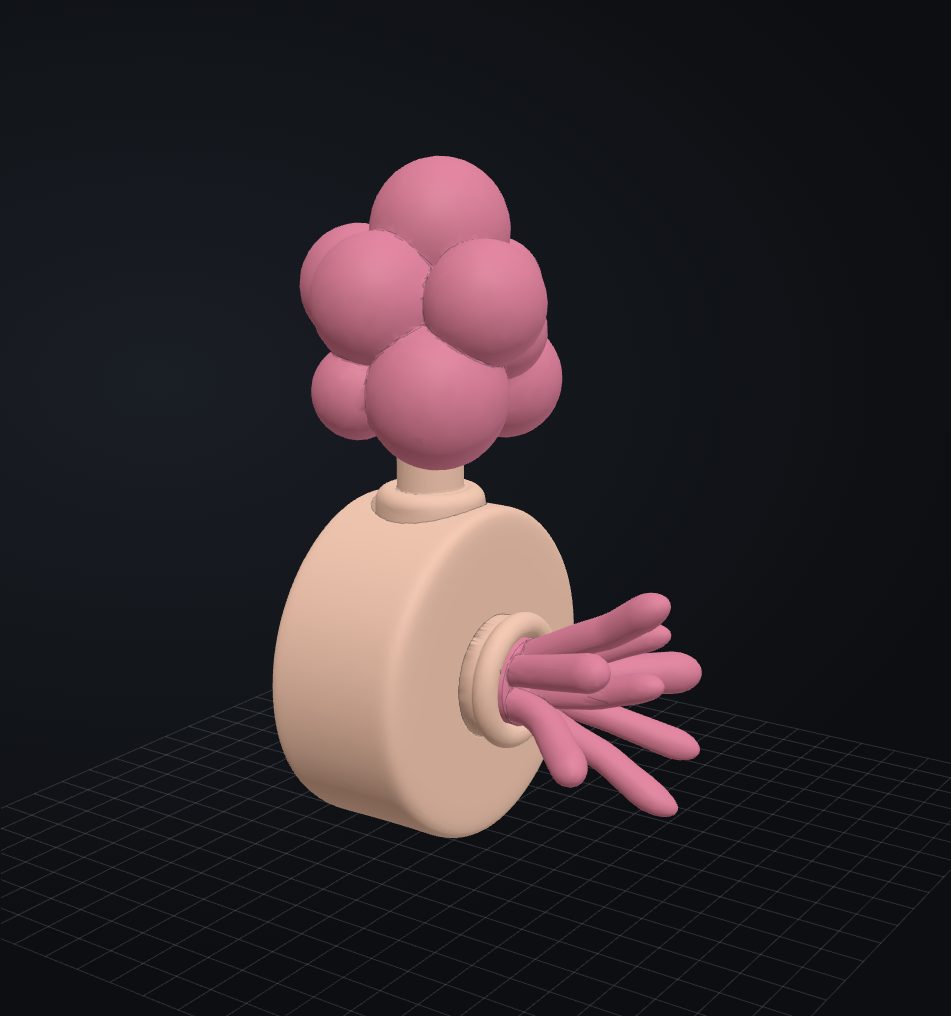
The Plumbus went through unflat publish. The uploaded cactus and toilet meshes went through the same publish and export. All three are on this page, each with its own license terms below.
| Model | Author and source | License | What I changed |
|---|---|---|---|
| Plumbus | “Plumbus as seen in Rick and Morty” by rayjizza, six separately printable parts. A fan model of the show's prop. | CC BY-NC 4.0. Noncommercial use only, with credit. | I assembled the parts, turned the handle into its socket, aligned the fan stem with its collar and reduced the triangle count for the web. Warm blush and rose-pink colors follow the original. The explode directions are mine, not the author's instructions. |
| Pop-eyed Cactus | Pop-eyed Cactus by Patopato_Design. Title and author come from the uploaded 3MF. | Standard Digital File License. Published with the author's permission. | The four source meshes, unchanged. Source offsets restore the original pose; print-bed transforms are left out. Review colors and explode directions are mine. Static assembly. A trial bend of the central leaf didn't give faithful eye travel, and the eye and leaf intersections in the source are unresolved. |
| Uploaded toilet | Uploaded Prusa3MF with base, seat, lid and tank. Author and identity as The Golden Toilet are unverified. | License fields empty. Published with the uploader's stated permission. | Original triangle meshes kept. Gold body, burgundy seat. The lid and seat turn on hinge axes measured from the geometry; the author supplied no articulation. Source offsets and print-bed transforms are recorded separately. No flush animation. |
Rendering: three.js 0.180.0 (MIT), the same version Unflat ships.
the longer story
How it started
Read the original write-up
Always just out of frame
I was working through iterations of a 3D-printed iPhone charging stand with Hermes. Each revision came back to me in chat: a description of what changed, maybe an image, another description when I asked about the other side. The part I needed to inspect was always just out of frame. Is that wall thick enough? Where does the cable go? What does the tray look like underneath?
I could keep asking the agent to take more screenshots. Or I could give us both a better place to look.
- 01 · WHAT I GOT
A screenshot
One angle, chosen for me. The part I need is always just out of frame.
- 02 · WHAT I NEEDED
The actual model
Orbit it, pinch it, hide a part, pull the assembly apart, clip it to look inside.
- 03 · WHAT HERMES SENDS
One fixed version
A link to that exact revision. Old ones stay put; the hash is an integrity check, not a key.
- 04 · WHAT I SEND BACK
Feedback on the shape
I point at the object we both see, not at a paragraph we both imagine.
then the next revision, with its own fixed link — and around again
The missing object
A printable model is not a paragraph, and one render is not the model. I wanted to orbit it on my laptop, pinch and turn it on my phone, hide a part, pull an assembly apart, and open a specific revision again tomorrow. Most importantly, when Hermes changed the design, I wanted a link to that exact version in the conversation — not another round of “can you show it from the other side?”
Three.js was the useful piece of the puzzle: it renders the geometry in a browser, where I can actually move around it. Unflat grew around it. A small publisher takes STL parts and their placement metadata, turns them into browser-friendly GLB files, and exports a read-only gallery and viewer. That private review surface is a static site; it does not need an application server to show a model.
- 01Hermesmakes a revision
- 02Publisherexports it as an immutable version
- 03Hermessends me that version’s URL
- 04Meinspect it on desktop or mobile
- 05Megive feedback on the actual shape
The URL identifies a project and version; a content-hash prefix lets the viewer warn me if the content behind a link does not match what I was sent. Old revisions remain available for comparison rather than silently changing under the same name. The viewer lets me orbit, pan and zoom, select exact views with an orientation cube, show and hide parts, spread an assembly apart, and visually clip it along an axis to see inside.
Sharing one version, not the whole workshop
The private gallery is behind Basic Auth. Giving someone that login would let them browse the entire catalog, which is a terrible way to say “can you look at this revision?” So Unflat now has a separate share action: it makes a short link to one fixed version, without a gallery or access to future iterations. I can set its lifetime (30 days by default) and revoke it. Hermes can create a link through a CLI, and a person can use Share… in the private viewer. The recipient doesn’t need my Basic Auth login.
THE GALLERY LOGINBasic Auth
- rev n-1
- rev n
- rev n+1
- other models
The entire catalog, and every revision after this one. A terrible way to say “look at this”.
A SHARE LINKShare… or the CLI
- rev n-1 not reachable
- rev n this one, fixed
- rev n+1 not reachable
No gallery, no future iterations, and the recipient doesn't need my login.
- THE HASH
- On an ordinary version URL it is an integrity check, not an access key.
- THE GEOMETRY
- Whoever can open an interactive model can get it. A link limits which model, not what they can do with it.
That share link isn’t a magic DRM spell.
Removing a download button does not change that. I only share models I’m comfortable handing over as files. And the content hash on an ordinary version URL is an integrity check, not an access key. The private static viewer and the narrow sharing gate are intentionally separate jobs.
Why it isn't “a Hermes feature”
I built it while working with Hermes, but Unflat does not require Hermes to render anything. The static exporter takes files and metadata; any agent, script, or human that can run the publisher can make a version and send its link. Hermes is my current collaborator, not a dependency baked into the viewing surface. Harness-agnostic by design.
- 01 · ANYONE WHO CAN RUN IT
- Hermes today's collaborator
- another agent
- a script
- a human
- 02 · THE PUBLISHER
Files + metadata → a static version
No Hermes in the viewing surface. No user database, no mandatory login provider.
- 03 · TWO SEPARATE DOORSPrivate viewer & gallery
MY DEPLOYMENT HTTPS + Basic Auth at the edge
Share routeITS OWN GATE version-scoped, separate from the login
ANY INSTALLATION picks its own hosting and auth — as long as all private HTML, metadata, model files and downloads stay protected.
The viewer also has no built-in user database or mandatory login provider. My private deployment uses HTTPS + Basic Auth at the edge; the sharing route uses a separate, version-scoped access gate. Another installation can choose its own hosting and authentication policy, as long as all private HTML, metadata, model files and downloads remain protected. Auth-agnostic does not mean unprotected.
What changed in practice
The first useful test was a real multi-part charging-stand revision, not a demo cube. Instead of arguing over which side a render showed, I could isolate the holder and tray, look at assembled and exploded positions, and give feedback against a fixed version. When I actually need to print, the selected version offers an STL download for each part. The model became the shared reference; the chat became the place to decide what to change next.
The UI took its own iterations. A technically working viewer can still be bad at showing the object: too much version metadata on desktop, controls that eat the mobile screen, or a view cube that only looks interactive. The model now gets the canvas. Controls stay in one movable window on desktop and a compact bottom panel on mobile. Browser and emulator checks cover desktop and touch layouts; a real iPhone’s in-app browser still needs its own final check. That distinction matters more than a big green test count.
This is not a CAD editor, a slicer, or an autonomous design validator. It will not tell me whether a print fits. It does something narrower and more useful for this loop: